Source Specification Capability Rule Result
Every result traces back through this chain: a published source states a specification, the engine derives a capability from it, a fixed rule compares that capability against what you asked for, and the result you see is the direct output — never an opinion inserted along the way. This page describes each step precisely, including where the engine deliberately stops and answers UNKNOWN.
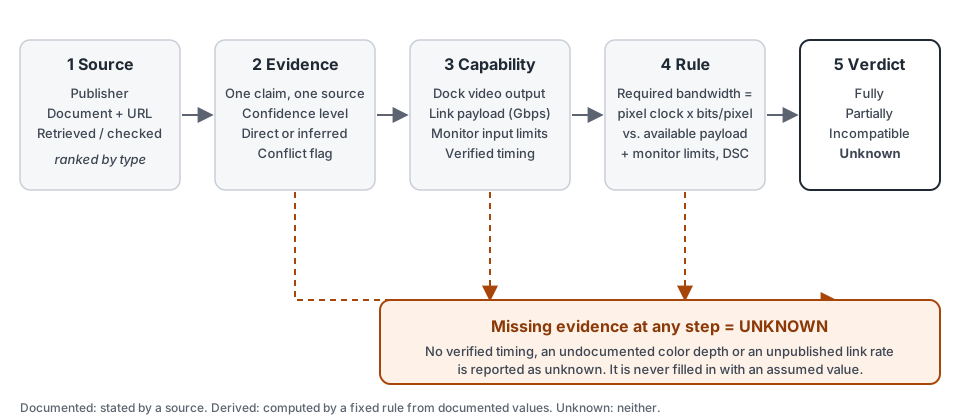
What CompatSense evaluates
CompatSense answers one focused question: can this dock and this monitor deliver the display mode you need — a resolution, refresh rate, color format and bit depth? It evaluates the dock’s video output, the link it uses, and the monitor’s documented input. It does not evaluate your laptop’s own port, cables, Power Delivery/charging or operating-system behavior; those are on the roadmap, not part of any result today. The devices and sources currently covered are listed in full on Dataset & Evidence Coverage.
Sources and the source hierarchy
Not all sources carry equal weight. In order of authority: standards bodies (VESA, HDMI Forum, USB-IF); technology owners (for example Intel for Thunderbolt); the manufacturer’s own documentation for a specific product; other official documentation and chipset datasheets; reputable technical media; independent testing; and community sources. Community claims are used last and are never presented as an official specification. The full policy — including how conflicts are settled — is on Sources & Corrections.
Evidence and provenance
No specification is used without provenance. Each claim the engine relies on is stored as an evidence record that ties one field of one device or protocol (for example “Dell WD22TB4 — maximum Power Delivery”) to a specific document, with:
- the publisher, document title and URL;
- the source type (its rank in the hierarchy) and the dates it was retrieved and last checked;
- a confidence level (high, medium or low);
- directness: whether the source states the value outright or the value was inferred from what it says;
- specificity: whether the claim is about a protocol in general or about this exact device;
- a conflict flag, set when another source disagrees.
The evidence rows and the source table behind every device are published on the coverage page, so a figure in a result can be traced to its document.
Documented, derived and unknown
Every value in a result is one of three kinds, and the engine never lets one pass for another:
- Documented — a source states it. A dock’s maximum Power Delivery figure quoted from the manufacturer’s user guide is documented.
- Derived — computed from documented values by a fixed rule, or inferred and labeled as such. The 12.799 Gbps a 3840×2160@60 8-bit mode needs is derived: 533.28 MHz × 24 bits per pixel. A pixel clock worked out from a manufacturer’s published horizontal frequency is inferred, and carries lower confidence than a quoted one.
- Unknown — no source states it and it cannot be derived responsibly. The maximum color depth of the LG 27UL650-W, for instance, is not documented in any source consulted; the engine records that as unknown instead of assuming a common value.
From evidence to capability
Capabilities are extracted only from evidence-backed fields. For a dock: how it connects to the laptop, which video outputs it has and on which protocol, and its documented Power Delivery figure. For a monitor: native resolution, documented refresh rates and HDR/VRR support, and, per input, the connector, maximum refresh rate, maximum color depth and DSC support. For a protocol: its raw link rate and encoding overhead. A field with no evidence is simply absent, and the rules below treat absence as unknown.
The same applies to the link itself. The Checker evaluates a dock’s output as DisplayPort 1.4 unless another protocol is requested, and that is only a documented capability when the dock’s documentation confirms the version. If it does not — the HP USB-C Dock G5, for example, lists “DisplayPort” with no version — the engine states the assumption it is making, treats the resulting bandwidth figure as inferred, never returns better than partially compatible, and lowers the confidence to low. If a dock documents no output of the requested type at all, the answer is UNKNOWN.
Bandwidth and timing calculations
Required bandwidth is the pixel clock multiplied by bits per pixel. Bits per pixel is three times the bit depth for RGB and YCbCr 4:4:4, twice for 4:2:2 and one and a half times for 4:2:0. The pixel clock is not derivable from resolution and refresh rate alone: it includes blanking intervals, and two monitors at the same resolution and refresh rate can use different clocks. So in the Checker the engine uses only a verified timing recorded for that monitor, connection and exact mode — a manufacturer’s mode table, a standard timing such as CTA-861 for HDMI, or a value derived from a manufacturer-published horizontal frequency using VESA’s CVT Reduced Blanking formula (labeled inferred). If no verified timing exists for the requested mode, the answer is UNKNOWN. The Bandwidth Calculator is different by design: it can use CVT-RBv2 to produce a standard-derived estimate, and labels it as an estimate rather than a verified value.
Available bandwidth is the link’s payload after encoding overhead, not its advertised raw rate:
- DisplayPort 1.4 — 32.4 Gbps raw (four lanes at 8.1 Gbps), 8b/10b encoding takes exactly 20%, leaving 25.92 Gbps.
- DisplayPort 2.0/2.1 (UHBR20) — 80 Gbps raw; real payload after forward error correction is 77.36–77.37 Gbps, slightly below the 77.58 Gbps that the 128b/132b encoding ratio alone suggests.
- HDMI 2.0 (TMDS) — 18 Gbps raw, 8b/10b encoding, 14.4 Gbps payload.
- HDMI 2.1 (FRL) — a distinct transport with a 48 Gbps ceiling, but the rate an individual device actually implements is not published for any device in the dataset. The engine therefore never assumes it: it evaluates against the verified HDMI 2.0 (TMDS) floor, and if the mode does not fit even there, the answer is UNKNOWN (the required transport family is known, the device’s rate is not) — not INCOMPATIBLE.
DSC (Display Stream Compression) lowers the requirement by a ratio VESA specifies (3:1 at 24 bits per pixel, 3.75:1 at 30). It is applied only when the mode does not fit uncompressed and support is documented for the monitor input. If DSC support is unknown, the engine does not assume it and says so in the result. A mode that fits only with DSC returns PARTIALLY_COMPATIBLE, because it works under a named condition. The figures above are cited in the evidence table and worked through in DisplayPort Bandwidth Explained and Display Stream Compression.
Compatibility rules and verdicts
Bandwidth is only half the check. The engine also compares the requested mode with what the monitor input documents: the resolution must not exceed the native resolution, the refresh rate must not exceed the documented maximum, and the color depth must not exceed the documented maximum. Anything the monitor does not document is unknown. The verdict follows fixed rules:
- Incompatible — a requirement that was asked about is documented as not met (the mode needs more bandwidth than the link carries, or exceeds the monitor’s documented limits).
- Unknown — no requirement is documented as failing, but at least one cannot be evaluated because the evidence is missing.
- Partially compatible — everything evaluates, but at least one requirement is met only under a named condition, such as DSC.
- Fully compatible — every requirement that was asked about is met without a condition.
The engine composes no sentences: it emits reason codes and the site turns each into text, so the same inputs always produce the same explanation.
Confidence
Each claim carries a confidence level from its source and how it is stated: standards bodies, technology owners and manufacturers start at high; official documentation, chipset datasheets and reputable technical media start at medium; independent testing and community sources at low. A claim that was inferred rather than stated drops one level, and a claim with a recorded conflict is low regardless of source. A result’s confidence is the lowest confidence among the claims it actually used — it can never be more certain than its weakest link — and a figure the engine needs but has no evidence for lowers it further. Confidence describes the evidence, not the outcome: it is never a guarantee.
UNKNOWN and missing evidence
UNKNOWN is a real answer, and it is not the same as incompatible: it means the dataset cannot say, so check the manufacturer’s documentation. The reasons the engine gives are specific — no verified timing for this monitor, connection and mode; a link whose usable capacity is not verified; an HDMI 2.1 rate the device does not publish; a monitor capability (refresh rate, color depth, DSC) that is not documented. It never fills a gap from a product’s marketing name: a “USB4” label does not guarantee a bandwidth, and an “HDMI 2.1” label does not guarantee an FRL rate. How many results are UNKNOWN today, and why, is shown on the coverage page — computed from the live data.
Update and review lifecycle
New devices and evidence enter through a validated import and are added deliberately, prioritizing verified specifications and timings over breadth. The engine is regression-tested against a fixed set of golden cases — real devices and modes with a documented expected outcome — and a selection of them is re-run against the live dataset on the coverage page, so a change that alters a result is visible. Each source records when it was retrieved and last checked. Re-verification is done by hand when a source or product changes; there is no automated re-check job yet. Editorial articles show a “Last reviewed” date that changes when their claims and sources are re-checked, not for typo fixes. Errors are handled as described in Sources & Corrections.
What CompatSense doesn’t claim
We do not claim that every device is covered, that a result is a guarantee, or that we have physically tested a combination. No hardware testing is claimed anywhere on this site unless a page states it explicitly. Results are computed from published specifications; a real setup can still differ because of firmware, drivers, cable quality or a laptop port that does not carry video.